TMNet's Streamyx, as part of their antiflooding attempts of their service implements the blocking of port 25 which is commonly used for sending emails using SMTP for. As a streamyx user (non corporate/non fixed IP user), you may find this a nuisance especially if you use your office corporate email to send and receive emails.
So, what are our options here?
1. Use Streamyx's SMTP.
Use the smtp server smtp.streamyx.com. Make sure to provide authentication in the form of yourusername@streamyx.com and provide your streamyx broadband password. Be aware that the default streamyx password tmnet123 should be changed immediate at https://tmbill.tm.net.my/SelfCare/Maintenance/selfcareLogin.jsp then use another complex password. When doing this, it will affect your streamyx login (when dialing into streamyx on your PC or router) as well as your email facilities and online billing facilities.
2. If you can, use SMTP on another port, e.g. port 20025. Most SMTP server is capable of adding a new port to an existing IP address or another IP address. Open up your corporate firewall for that port and change the port settings of your corporate email to the port you've specified in your corporate email server's SMTP service.
3. Use VPN
Anything inside the VPN tunnel cannot be "seen" by filters like TMNet's packet filters
4. Use webmail - no explaination needed here rite :P
5. Change to different ISP (yea, like we've got heaps of choices, sigh)
Tuesday, April 15, 2008
Free Internet Filter (and open & fast dns server)
Lets face it, you can have a 100Mbps link to the WWW but it makes a huge performance (speed) impact if you have crappy DNS servers. This could mean DNS servers that are easily poisoned, DNS servers that are slow and DNS servers that are unreliable. For instance this afternoon, i was using Jaring's infamous 192.228.128.20 and 161.142.2.17, i had problems accessing HP's driver download site, quickly i realized this could be a DNS related issues cause IP based accesses seem fast (doh)..so, i googled a little and found this...www.opendns.com
This pretty nifty site provides two DNS addresses, 208.67.222.222 and 208.67.220.220. These two IPs are publicly routable and available for immediate use. With some lame tests i found these DNS servers respond in about millisecond faster than time it takes to respond from TMNut's 202.188.0.133 and 202.188.1.5 servers. If that's not convincing enough to churn, read on.
Goody bag
OD gives you an option (purely optional) to create an account. What can we do with that account? Well, simply, use DNS facilities to do addresses filtering, yup, you got it, a free DNS based filtering (phishing, pharming, porn filter - i will certainly omit the last filter factor :P ). Any organization could also use this especially if you use a fixed IP address.
If you don't have fixed IPs like me, their software provides dynamic IP such as the dyndns fellas. OpenDns has a facility called DNS-O-Matic which integrates common dynamic DNS providers and OpenDNS's filtering mechanism. Instructions and how-to is very clearly available on their www.opendns.com web site.
So, once you've sorted out your IPs and which network you belong, you can
go about the business of filtering! There are over 50 predefined categories filters and custom categories you can work with. Also, you could block based on domain names. More cooler, is the typo correction. People in a rush to get their groove on may mistype domain names and end up in some phishing scam site. Worry not my friend, this pretty lil thing again does the trick to help resolve incorrectly requested fields e.g. http://highsecurity.blogspot.cm will be "fixed" to http://www.highsecurity.blogspot.com. Neat!.
Lastly, this tool gives you reports! Yes, finding why your internet line is super chugged, bloodsucking websites such as Friendster and Facebook could be the culprits, then disable them. Yes, you can receive lifelong curses and odd stares while walking to the pantry but saves you the much precious bandwidth. Also, if you think that there's issues with the cache responses, you can choose to clear it right from their website.
You can have exceptions, this can be mitigated by using the whitelist feature that will then bypass all rules and settings that you have in the categories, individual domain and other possible false positive or exceptional sites you may wish to allow you users to browse to. Cool.
So, this will solve my content filtering issues?
Well, yea, sorta, users can however browse using IP addresses or change to another DNS server on their local TCP-IP settings. To mitigate this, implement an application layer firewall that will disallow access by using IP and direct DNS queries.
What about other protocols other than web based? Well, yea, other protocols when using names may work (not tried em all) but the fundamental is that, when name is resolved by IP in opendns.com servers, it will filter which is allowed and which is not. Only then, this tool will work. Novice users may truly be pissed... :D
What you need to be aware of using 3rd party DNS servers?
They could monitor your activity for statistical purposes or etc (god knows whatelse they will do with your data). If you are an organization which value privacy of users accessing the WWW, be aware of the possible consequences.
This pretty nifty site provides two DNS addresses, 208.67.222.222 and 208.67.220.220. These two IPs are publicly routable and available for immediate use. With some lame tests i found these DNS servers respond in about millisecond faster than time it takes to respond from TMNut's 202.188.0.133 and 202.188.1.5 servers. If that's not convincing enough to churn, read on.
Goody bag
OD gives you an option (purely optional) to create an account. What can we do with that account? Well, simply, use DNS facilities to do addresses filtering, yup, you got it, a free DNS based filtering (phishing, pharming, porn filter - i will certainly omit the last filter factor :P ). Any organization could also use this especially if you use a fixed IP address.
If you don't have fixed IPs like me, their software provides dynamic IP such as the dyndns fellas. OpenDns has a facility called DNS-O-Matic which integrates common dynamic DNS providers and OpenDNS's filtering mechanism. Instructions and how-to is very clearly available on their www.opendns.com web site.
So, once you've sorted out your IPs and which network you belong, you can
go about the business of filtering! There are over 50 predefined categories filters and custom categories you can work with. Also, you could block based on domain names. More cooler, is the typo correction. People in a rush to get their groove on may mistype domain names and end up in some phishing scam site. Worry not my friend, this pretty lil thing again does the trick to help resolve incorrectly requested fields e.g. http://highsecurity.blogspot.cm will be "fixed" to http://www.highsecurity.blogspot.com. Neat!.
Lastly, this tool gives you reports! Yes, finding why your internet line is super chugged, bloodsucking websites such as Friendster and Facebook could be the culprits, then disable them. Yes, you can receive lifelong curses and odd stares while walking to the pantry but saves you the much precious bandwidth. Also, if you think that there's issues with the cache responses, you can choose to clear it right from their website.
You can have exceptions, this can be mitigated by using the whitelist feature that will then bypass all rules and settings that you have in the categories, individual domain and other possible false positive or exceptional sites you may wish to allow you users to browse to. Cool.
So, this will solve my content filtering issues?
Well, yea, sorta, users can however browse using IP addresses or change to another DNS server on their local TCP-IP settings. To mitigate this, implement an application layer firewall that will disallow access by using IP and direct DNS queries.
What about other protocols other than web based? Well, yea, other protocols when using names may work (not tried em all) but the fundamental is that, when name is resolved by IP in opendns.com servers, it will filter which is allowed and which is not. Only then, this tool will work. Novice users may truly be pissed... :D
What you need to be aware of using 3rd party DNS servers?
They could monitor your activity for statistical purposes or etc (god knows whatelse they will do with your data). If you are an organization which value privacy of users accessing the WWW, be aware of the possible consequences.
Sunday, April 6, 2008
My Samsung & How To Disable ActiveSync From Buggin' You
I just got meself a samsung i780, pretty nifty runs on Windows Mobile 6. I installed Activesync as usual to get things sorted out between the phone and the computer. I got pretty frustrated once i was unable to unload this darn thing (activesycn) off my memory. Each time activesync rounds up its business of synch-ing, it turns on my phone LCD and keep its on.
This is especially pretty frustrating when you just wanna charge the darn thing using USB. Each time Activesync runs, somewhat my Vista just freezes like its loading large fat apps like Photoshop and i gotta wait a couple of seconds before things regain consciousness again...Also, even if you kill wcescomm.exe it will keep coming back again, like ex-girlfriends and Prudential Insurance Agents. M$ didn't include an exit or "do not load during startup" function. Of course you could use msconfig.exe to de-select it but it will pop right back up when an activesync device is plugged in.
So i was googling around and found this hack, it allows you to switch the crappy ActiveSync off and on. How cool, finally... Microsoft can't rule the world (mobile edition)...give the control back to us!!!
ActiveSync Toggle: Checkit out: http://pocketpcfreewares.com/en/index.php?soft=546
Cheers,
Sanjay
This is especially pretty frustrating when you just wanna charge the darn thing using USB. Each time Activesync runs, somewhat my Vista just freezes like its loading large fat apps like Photoshop and i gotta wait a couple of seconds before things regain consciousness again...Also, even if you kill wcescomm.exe it will keep coming back again, like ex-girlfriends and Prudential Insurance Agents. M$ didn't include an exit or "do not load during startup" function. Of course you could use msconfig.exe to de-select it but it will pop right back up when an activesync device is plugged in.
So i was googling around and found this hack, it allows you to switch the crappy ActiveSync off and on. How cool, finally... Microsoft can't rule the world (mobile edition)...give the control back to us!!!
ActiveSync Toggle: Checkit out: http://pocketpcfreewares.com/en/index.php?soft=546
Cheers,
Sanjay
Thursday, December 6, 2007
Windows Vista Service Pack 1 - The Real Deal
Long awaited SP1 for users of Vista is around the corner. I just got a glimpse of the beta site MS has setup to enable dev folks and private beta testers to roll out.
So what's the deal all about. Well, it's simple enhancements from a security, performance and functionality point of view. According to a MS correspondent, the SP1 BETA it should be available in next week or so (2-3 week of December). The final RTM will be available in first Q of 2008.
First to state is the fact that it comprise of many patches, updates and upgrades previously made available via Windows or Microsoft update websites. One key improvement is the administrative enhancements to ease admins of their daily routines.
In short, Microsoft summarizes Vista SP1 as;
State-worthy 2: Administrative Improvements
And finally, it will support SSTP, an emerging VPN protocol that work better with NATs and other challenges that legacy VPNs face.
Alright, there you go, one thing's for sure, i'm gonna' get this baby once it's out in the market. I guess i can get a copy since i'm a beta tester for certain products, perhaps could pull some strings to get the Sp1 beta prior to public release (for all kiasu's sake la)
Parts of this article is taken off the Vista team blog website at: http://windowsvistablog.com/blogs/windowsvista/pages/windows-vista-service-pack-1-beta-whitepaper.aspx

So what's the deal all about. Well, it's simple enhancements from a security, performance and functionality point of view. According to a MS correspondent, the SP1 BETA it should be available in next week or so (2-3 week of December). The final RTM will be available in first Q of 2008.
First to state is the fact that it comprise of many patches, updates and upgrades previously made available via Windows or Microsoft update websites. One key improvement is the administrative enhancements to ease admins of their daily routines.
In short, Microsoft summarizes Vista SP1 as;
- Quality improvements, including all previously released updates, which address reliability, security, and performance.
- Improvements to the administration experience, including BitLockerTM Drive Encryption (BDE).
- Support for emerging hardware and standards, such as an Extensible Firmware Interface (EFI) and an Extended File Allocation Table (exFAT).
- Introduction of new cryptography standards
- Integration with security center, APIs and other interfacing mechanisms for security companies to integrate with Vista (once a huge concern with ASVs)
- Lesser crashes through analysis via the Windows Error Reporting avenue
- Better hibernation/sleep restoration (this is surely a needed!)
- Copying and extracting files should be faster! - I hope they got rid of that inaccurate graphical display and ETA timer...
- Faster IE Experience with lower CPU utilization, logon delays have been removed, increased battery life (by reducing screen redraws) and also, much needed/awaited, improvement in network file sharing by reducing the actual bandwidth used to do so
State-worthy 2: Administrative Improvements
- Bitlocker available for other than C (finally!!!)
- Group policy management enhancement
And finally, it will support SSTP, an emerging VPN protocol that work better with NATs and other challenges that legacy VPNs face.
Alright, there you go, one thing's for sure, i'm gonna' get this baby once it's out in the market. I guess i can get a copy since i'm a beta tester for certain products, perhaps could pull some strings to get the Sp1 beta prior to public release (for all kiasu's sake la)
Parts of this article is taken off the Vista team blog website at: http://windowsvistablog.com/blogs/windowsvista/pages/windows-vista-service-pack-1-beta-whitepaper.aspx
Thursday, October 4, 2007
Delete ALL SMTP Queues In Exchange 2007 (Quick and Dirty)
Had a client that was subjected to an open relay attack. In mere hours their Exchange 2007 was filled with not less than 100,000 outbound emails, indicating this server is a possible open relay. I though, i should try out the GUI to start cleaning junk emails, so i loaded the Exchange Management Console, went to tools and checked out the queues in Queue Viewer. True enough, there was emails not destined to our internal mail client again suggesting a security problem.
Due to these overwhelming SMTP connections, it comes as no surprise that the processor on this 64bit OS box went on overtime. The Exchange SMTP runs on an Image called EdgeTransport.exe and this piece went over 50% of processor time most of the time. It even reached 99% at some points when im not looking :)
Anyway, fact is, using EMC's GUI will take hours! to clean up e.g. 100,000 emails (and counting). So i decided to hit the kitchen sink with the SMTP queues in Exchange by deleting the them through Explorer.
In essence, to completely wipe out the queues in Exchange 07 perform the following;
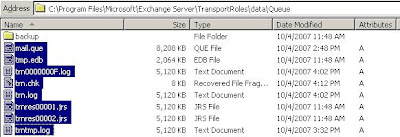 Image above: The physical path of the mail queue which also could be found by looking for the file mail.que like above. Since the mail queues are ESE, simply removing the mail.que file may not work (just like removing the edb/stm file without removing the related transaction logs)
Now, more importantly, close that relay! and enjoy Exchange 2007. PS. I do not warrant against klutziness and failure to backup/test backups. I don't even think MS approves of such vicious method, but it worked like a charm and i swooped 1GB of smtp spam in 2 minutes :D
Due to these overwhelming SMTP connections, it comes as no surprise that the processor on this 64bit OS box went on overtime. The Exchange SMTP runs on an Image called EdgeTransport.exe and this piece went over 50% of processor time most of the time. It even reached 99% at some points when im not looking :)
Anyway, fact is, using EMC's GUI will take hours! to clean up e.g. 100,000 emails (and counting). So i decided to hit the kitchen sink with the SMTP queues in Exchange by deleting the them through Explorer.
In essence, to completely wipe out the queues in Exchange 07 perform the following;
- Stop Exchange Transport
- Browse to the folder where mail.que is stored (our server was in mail.que at c:\program files\Microsoft\Exchange Server\TransportRoles\data\Queue)
- Delete or move everything there
- Start the Exchange Transport
- Open up Queue Viewer, and verify that every thing's cleared..Exchange has now recreated mail.que and associated files like in the beginning of time..:P
 Image above: The physical path of the mail queue which also could be found by looking for the file mail.que like above. Since the mail queues are ESE, simply removing the mail.que file may not work (just like removing the edb/stm file without removing the related transaction logs)
Now, more importantly, close that relay! and enjoy Exchange 2007. PS. I do not warrant against klutziness and failure to backup/test backups. I don't even think MS approves of such vicious method, but it worked like a charm and i swooped 1GB of smtp spam in 2 minutes :D
Monday, September 24, 2007
MSN and MS-Agent exploits
There are two rated high vulnerabilities exist in Microsoft software that's publicly disclosed and have the patches released!
One of them affecting Windows OS is explained in http://www.microsoft.com/technet/security/bulletin/ms07-051.mspx for MS Agent vulnerability which pretty much affects those using Windows 2000 with SP4 (most likely a lot of W2K users). This attack requires access to a vulnerable (or malicious) website which you choose to access. Mitigation factors include disabling MSAgent or otherwise, more effectively, do not get too "friendly" on the WWW and get that patch.
MSN Messenger (and Windows Live Messenger) is also vulnerable to an exploit by crafting a malicious code inside the the request to ACCEPT AN INVITATION FOR VIDEO CHAT. I regard this as quite dangerous as this particular type of vulnerability can easily be scripted and thus spawn the network for vulnerable sources. MS KB article here explains it all http://www.microsoft.com/technet/security/Bulletin/MS07-054.mspx. This particular attack however does require a user interaction where an "accept" response is required for the exploitation to successfully take place. Also, when compromised, if you turn on UAC in Vista, most likely the action to allow administrative rights will be triggered by UAC. This is when you say no if all else fails up this point.
Does this affect you? Most likely if you use Windows 2000 or Windows Live Messenger or both.
How bad is it? Remote exploitation is possible and can run in the context of a currently logged on user.
Both problems have been reported responsibly and Microsoft has publicly released related patches. Please update your software.
One of them affecting Windows OS is explained in http://www.microsoft.com/technet/security/bulletin/ms07-051.mspx for MS Agent vulnerability which pretty much affects those using Windows 2000 with SP4 (most likely a lot of W2K users). This attack requires access to a vulnerable (or malicious) website which you choose to access. Mitigation factors include disabling MSAgent or otherwise, more effectively, do not get too "friendly" on the WWW and get that patch.
MSN Messenger (and Windows Live Messenger) is also vulnerable to an exploit by crafting a malicious code inside the the request to ACCEPT AN INVITATION FOR VIDEO CHAT. I regard this as quite dangerous as this particular type of vulnerability can easily be scripted and thus spawn the network for vulnerable sources. MS KB article here explains it all http://www.microsoft.com/technet/security/Bulletin/MS07-054.mspx. This particular attack however does require a user interaction where an "accept" response is required for the exploitation to successfully take place. Also, when compromised, if you turn on UAC in Vista, most likely the action to allow administrative rights will be triggered by UAC. This is when you say no if all else fails up this point.
Does this affect you? Most likely if you use Windows 2000 or Windows Live Messenger or both.
How bad is it? Remote exploitation is possible and can run in the context of a currently logged on user.
Both problems have been reported responsibly and Microsoft has publicly released related patches. Please update your software.
Tuesday, September 18, 2007
Outlook Tip: Retrieving "lost" attachments
When you directly open up attachments in Outlook, they launch the application that corresponds to that attachment, e.g. a .xls file will launch Microsoft Excel. So when you start working on this file, remember to save it somewhere else (save as) to where all your other files are stored. When you click save, it will save the file in Outlook's temporary attachment cache folder.
Just say you've saved a file (File->Safe) and closed Excel, then later cant find the file anymore!!! you start to get all Tasmanian devil about it..ITS NOT even in the Excel's recently opened document list. Well DON'T PANIC YET...
Most attachments launched directly from Outlook will be stored in a cache (temp) folder before getting executed within the corresponding application. This folder is normally in C:\Documents and Settings\username\Local Settings\Temporary Internet Files\OLKxxx (where username is your logon username) . This is where all temporary files are stored directly from outlook. Some may have different settings to this and you can easily find this path out inside your registry Key HKEY_CURRENT_USER\Software\Microsoft\Office\11.0\Outlook\Security and look for the key OutlookSecureTempFolder...
Now access the file/folder directly using run or explorer (note in most OS-es, this particular folder and preceeding folders could be hidden, so unhide it from Explorer's folder options first).
This is also a great place to find out what you girlfriend's been receiving in her email... :P
Just say you've saved a file (File->Safe) and closed Excel, then later cant find the file anymore!!! you start to get all Tasmanian devil about it..ITS NOT even in the Excel's recently opened document list. Well DON'T PANIC YET...
Most attachments launched directly from Outlook will be stored in a cache (temp) folder before getting executed within the corresponding application. This folder is normally in C:\Documents and Settings\username\Local Settings\Temporary Internet Files\OLKxxx (where username is your logon username) . This is where all temporary files are stored directly from outlook. Some may have different settings to this and you can easily find this path out inside your registry Key HKEY_CURRENT_USER\Software\Microsoft\Office\11.0\Outlook\Security and look for the key OutlookSecureTempFolder...
Now access the file/folder directly using run or explorer (note in most OS-es, this particular folder and preceeding folders could be hidden, so unhide it from Explorer's folder options first).
This is also a great place to find out what you girlfriend's been receiving in her email... :P
Thursday, September 13, 2007
Split-brain DNS
Many a times you might cross organizations that implement internal DNS for name resolution. This is especially true for those running Microsoft Active Directory, where DNS plays an integral part in it's directory services lookup. Problems can happen when especially the domain names for both internal and external happen to be the same or to achieve seamless name resolution, an internal DNS need to exist to match that of external names.
Lets take for instance an email client that connects to their email infrastructure using the name email.company.com. In this case, when a user goes out of the organization, he or she can receive emails since the name email.company.com resolves to a valid external IP. Now, this user comes back into company and the company implements Active Directory but when resolving email.company.com either;
a. Does not get resolved as you may have a similar zone setup
b. Resolves to an external IP (whereas the server is actually internal)
Both these problems mean, the user may not be able to receive emails no more.
This is where administrators can setup a split-brain DNS. A split-brain dns in simplest possible explanation is having similar DNS zones internally and externally. Records like A, CN, SVR can be different as long as it meets your requirement for security, performance and accessibilities.
For instance, taking the exact example above, say Ahmad receives emails externally by using the email.company.com (which resolves to 202.188.0.133) then he comes back to his office, the exact same name email.company.com now resolves to 10.1.1.1 which is their email server but accessed internally now. This is because his administrator has setup a split-brain dns to ensure internal users do not resolve internally servers as external IPs and work the gateway for no apparent benefit.
There's a little bit of administration involved to ensure records match that of the internet. You must create records that correspond to the split brain domain to match the resources or records that exist externally if this record or server does not exist internally. For instance, the company in our example, hosts their external DNS to an ISP. This ISP also hosts their website www.company.com. This record should also exist in your network, simply because you assume the ownership of the zone company.com in your split-brain dns setup. Otherwise, users will not be able to access this www.company.com internally if you do not have such record. This record however will contain a live IP address matching that of the ISP. Remember, if the record does not exist, it will fail and will not forward to a root or top level DNS since you assume the role of the authority of this domain company.com.
There's a downside to this amongst others, is that is it can be subject to abuse and thus lead to a phishing or pharming attack. Imagine, internally you could setup the zone maybank2u.com and host your own www.maybank2u.com to resolve to your own little fake maybank2u website ;)...fun eh.
Lets take for instance an email client that connects to their email infrastructure using the name email.company.com. In this case, when a user goes out of the organization, he or she can receive emails since the name email.company.com resolves to a valid external IP. Now, this user comes back into company and the company implements Active Directory but when resolving email.company.com either;
a. Does not get resolved as you may have a similar zone setup
b. Resolves to an external IP (whereas the server is actually internal)
Both these problems mean, the user may not be able to receive emails no more.
This is where administrators can setup a split-brain DNS. A split-brain dns in simplest possible explanation is having similar DNS zones internally and externally. Records like A, CN, SVR can be different as long as it meets your requirement for security, performance and accessibilities.
For instance, taking the exact example above, say Ahmad receives emails externally by using the email.company.com (which resolves to 202.188.0.133) then he comes back to his office, the exact same name email.company.com now resolves to 10.1.1.1 which is their email server but accessed internally now. This is because his administrator has setup a split-brain dns to ensure internal users do not resolve internally servers as external IPs and work the gateway for no apparent benefit.
There's a little bit of administration involved to ensure records match that of the internet. You must create records that correspond to the split brain domain to match the resources or records that exist externally if this record or server does not exist internally. For instance, the company in our example, hosts their external DNS to an ISP. This ISP also hosts their website www.company.com. This record should also exist in your network, simply because you assume the ownership of the zone company.com in your split-brain dns setup. Otherwise, users will not be able to access this www.company.com internally if you do not have such record. This record however will contain a live IP address matching that of the ISP. Remember, if the record does not exist, it will fail and will not forward to a root or top level DNS since you assume the role of the authority of this domain company.com.
There's a downside to this amongst others, is that is it can be subject to abuse and thus lead to a phishing or pharming attack. Imagine, internally you could setup the zone maybank2u.com and host your own www.maybank2u.com to resolve to your own little fake maybank2u website ;)...fun eh.
Monday, September 3, 2007
ISA Server 2006 VS Exchange Outlook Web Access
A customer from Cambodia (shout out to Whaddanak of CBL) once asked ways in which one can publish a front end Exchange server securely in a DMZ (DeMilitarized Zone). The obvious answer is DEFINITELY YES. Since Exchange 5.5, OWA could easily be isolated from the internal network thus lowering the risk of a security compromise on valuable data such as mailboxes.
Publishing a Front End server in Exchange 2000, 2003 and 2007 today is a little like taking an Exchange box and stripping it down to "enough" features for; all required Exchange services to work and of course, the Web components and dependencies such as IIS. While this is a great way to start working towards security but it still introduces concerns to administrators for possible administrative and certain security issues for example, Active Directory membership (since the Exchange server needs to be part of the domain) ports need to published between DMZ to Internal DCs, securing the Windows server in which Exchange server reside (since it's being placed in a DMZ) and configuring firewalls to allow communication between internal mailbox servers (which can be rather complex since you need to codehack ports in which the information store listens on etc). Other concerns could also be the inability to implement multiform factor authentication (which is not possible with just Exchange FE-s). Here's a good (detailed) sample article one can use to do just Exchange FE publication on DMZs or alike http://www.msexchange.org/tutorials/OWA_Exchange_Server_2003.html
Fortunately, there's a much easier, secure and "cheaper" way. Yes, you guessed it, USE ISA SERVER 2006. Cheaper? (i leave this to you to do the math here).
Lets continue this topic by simply looking at key differences which an organization can directly benefit by using ISA Server as their FE for Exchange OWA. Here, i present, my oh-so-familiar way of presenting benefits:
ISA Server's top 10+1 reasons as an Exchange OWA Front End
Happy ISAlating your Exchange
Publishing a Front End server in Exchange 2000, 2003 and 2007 today is a little like taking an Exchange box and stripping it down to "enough" features for; all required Exchange services to work and of course, the Web components and dependencies such as IIS. While this is a great way to start working towards security but it still introduces concerns to administrators for possible administrative and certain security issues for example, Active Directory membership (since the Exchange server needs to be part of the domain) ports need to published between DMZ to Internal DCs, securing the Windows server in which Exchange server reside (since it's being placed in a DMZ) and configuring firewalls to allow communication between internal mailbox servers (which can be rather complex since you need to codehack ports in which the information store listens on etc). Other concerns could also be the inability to implement multiform factor authentication (which is not possible with just Exchange FE-s). Here's a good (detailed) sample article one can use to do just Exchange FE publication on DMZs or alike http://www.msexchange.org/tutorials/OWA_Exchange_Server_2003.html
Fortunately, there's a much easier, secure and "cheaper" way. Yes, you guessed it, USE ISA SERVER 2006. Cheaper? (i leave this to you to do the math here).
Lets continue this topic by simply looking at key differences which an organization can directly benefit by using ISA Server as their FE for Exchange OWA. Here, i present, my oh-so-familiar way of presenting benefits:
ISA Server's top 10+1 reasons as an Exchange OWA Front End
- Its a firewall - Once installed, it's a dead Windows box which only do stuff you allow it to do. You do not need to crack your head open on how to block ports and secure this secure that. Of course, you still need the basic hardening guides to help enhance the ISA box..la.
- It can publish one or more Exchange OWA or backend servers with OWA enabled and do a better load balancing job (like application response-e.g. http/s-get) than WNLB (network level only)
- You can do all the HTTP filtering you would normally do with an ISA server like URL filters like HTTP signatures filtering, headers, extensions, methods, HTTP redirection to HTTPS (which you would normally use a ASP script in OWA 2K3 or lower) setup concurrent connections and connection limits (anti DoS), etc...
- Perform higher degree of control by using Forms based authentication via ISA server like the use of persistent cookies, HTML customization and password management.
- Single Sign On - Yes, once you sign on to OWA, you could also be signed on to say your intranet web servers!
- You can filter out users at the ISA server level itself and lockdown on users whom are not suppose to use OWA or enforce limits on time for instance. You can also specify sources like directory based users groups, IP addresses, domain names, etc.
- You can choose to bridge SSL! That hundreds of thousands of dollars application filtering IPS can finally see what's going on with OWA on SSL
- It can support multiform authentication - Yes, multifactor auth is possible meaning you could have your OWA users sign on to a certificate and/or an RSA token or a combination.
- Setting it up is a breeze, you do not need to introduce an additional Exchange server in your organization (or the Exchange SM ). All done through wizards and its up and running when you click APPLY!
- It can cache!, compress, you can do other fun stuff like taking the OWA offline by sending users to a "...this page is unavailable page.." for maintenance and you do it all from ISA rules!
- BONUS POINT: You could also perform attachment rules, customized logoff pages etc straight from the ISA server rule line itself.
Happy ISAlating your Exchange
Wednesday, August 29, 2007
DNS and ISA Server
A shout out to my friend Velan Ramalinggam, thanks for your help today :)
We just got back from a customer's site and they had a complain that after enabling ISA server proxy forwarding option through routing, the ISA server became a crawl. Although direct, the access is pretty acceptable.
After some initial diagnosis, we found that the DNS was not forwarding to external DNS servers correctly. We fixed it by changing to a valid external DNS forwarding server and everything seem to worked pretty well.
So in conclusion, we noticed that the ISA had rules that refer to websites (names). There were around 20 such rules. By enabling such rules, for example, block the website http://www.friendster.com/, the ISA server would then need to resolve this name to IP and evaluate the rule whether it is a match or otherwise. Since the DNS didn't resolve the names in those rules had to wait for a timeout then moved on to another rule and so forth. This caused a significant delay in evaluating those rules before it reaches the rule that allows people to browse when there's a no-match. One would think, well, since i am forwarding packets through a proxy "in front" of the ISA why would you need such DNS resolution (especially to an external DNS)? Well, this is by design and in some versions of ISA server, we can disable this lookup feature provided if we do not have rules that have names (external names particularly) and we forward ISA's web requests to a forward proxy.
Remember though, internal name resolution must work correctly especially if you use Active Directory and have internal/intranet websites.
Please note that you need name resolution to internet sites if you do not have a forward proxy configuration. In cases where you do forward to a forward proxy and you do not have names in your rules, you could wish to disable name resolution on the ISA server for external sites. An article from MS talks about this but this is for ISA 2004, not sure if ISA 2000 (which was what my customer had) has a way to do this or not!...http://www.microsoft.com/technet/isa/2004/plan/disablenameresolution.mspx
We just got back from a customer's site and they had a complain that after enabling ISA server proxy forwarding option through routing, the ISA server became a crawl. Although direct, the access is pretty acceptable.
After some initial diagnosis, we found that the DNS was not forwarding to external DNS servers correctly. We fixed it by changing to a valid external DNS forwarding server and everything seem to worked pretty well.
So in conclusion, we noticed that the ISA had rules that refer to websites (names). There were around 20 such rules. By enabling such rules, for example, block the website http://www.friendster.com/, the ISA server would then need to resolve this name to IP and evaluate the rule whether it is a match or otherwise. Since the DNS didn't resolve the names in those rules had to wait for a timeout then moved on to another rule and so forth. This caused a significant delay in evaluating those rules before it reaches the rule that allows people to browse when there's a no-match. One would think, well, since i am forwarding packets through a proxy "in front" of the ISA why would you need such DNS resolution (especially to an external DNS)? Well, this is by design and in some versions of ISA server, we can disable this lookup feature provided if we do not have rules that have names (external names particularly) and we forward ISA's web requests to a forward proxy.
Remember though, internal name resolution must work correctly especially if you use Active Directory and have internal/intranet websites.
Please note that you need name resolution to internet sites if you do not have a forward proxy configuration. In cases where you do forward to a forward proxy and you do not have names in your rules, you could wish to disable name resolution on the ISA server for external sites. An article from MS talks about this but this is for ISA 2004, not sure if ISA 2000 (which was what my customer had) has a way to do this or not!...http://www.microsoft.com/technet/isa/2004/plan/disablenameresolution.mspx
Subscribe to:
Posts (Atom)