Wednesday, August 5, 2009

MSI and Run As Administrator

Some MSI programs require elevated privilege to run and its always cumbersome to run it through runas.

In Windows Vista/7, the shell integration (right click) of an Exe will contain a Run As Administrator function like below.

image

But for MSI files, there’s no such context! Of course, there are otherways but this right click thingy is what i want, its quick and easy.

image

MSI files do not have the Run as administrator shell integration.

How to make that Run as administrator come integrated with MSI and or other executables (e.g. VBS, MSI, BAT). Try this.

For MSIs

Start notepad.exe and paste the below text exactly

Windows Registry Editor Version 5.00

[HKEY_CLASSES_ROOT\Msi.Package\shell\runas]

[HKEY_CLASSES_ROOT\Msi.Package\shell\runas\command]
@=hex(2):22,00,25,00,53,00,79,00,73,00,74,00,65,00,6d,00,52,00,6f,00,6f,00,74,\
  00,25,00,5c,00,53,00,79,00,73,00,74,00,65,00,6d,00,33,00,32,00,5c,00,6d,00,\
  73,00,69,00,65,00,78,00,65,00,63,00,2e,00,65,00,78,00,65,00,22,00,20,00,2f,\
  00,69,00,20,00,22,00,25,00,31,00,22,00,20,00,25,00,2a,00,00,00

Don’t worry about text residing to a point you can see, just copy and paste the whole table. When you paste the above, it MUST look something like this:

image

If it doesn’t stop right there, something is not right. Try again.

Now save this document as shell_enable_msi.reg (filename doesnt matter, just as long the extension is .reg. Make sure the registryicon appears after you do that like below.

image

This means its associated with the registry tool. Now double click the icon and UAC should complain, but just say yes on both counts!

image

image

Once exported, you should see this;

image

Now try again with that MSI extension. Voila!

image

And there you go.

Anyway, in case you’re curious what all those jargon you pasted into your registry its nothing much, its actually…

image

Tuesday, August 4, 2009

Exchange 2007 Service Pack 2 (SP2)


What to look forward to Exchange 2007 SP2 (these are the ones i really like, there are more of course)
  1. Enhanced Auditing – Not sure what’s brewing for this but in itself is great news. Exchange seriously needs to sort out and “humanize” their Audit trail logs. I had to go through hell just to know if someone logged with privileged rights to open another user’s mailbox. I will be very happy to see what’s installed for us in this SP2 auditing enhancements. Disgruntle employees perhaps need to read this before they “take over” the CIO’s mailbox again…
  2. It allows you to do backups straight away like what was available in MSbackup for ex2000/03 on Windows 2008 (called in box backup)
More on Exchange 2007 SP2 http://msexchangeteam.com/archive/2009/05/11/451281.aspx


Wait ..PowerGUI?????? what the..@@@@???!?!

Microsoft makes powershell and made Windows management as slick as the unix people do. Reading through the blog post of the Exchange team, i saw a post that made me search a little and verify.
Quest comes up with a GUI for powershell (slap head) called PowerGUI. MS makes a powerful scripting language to slowly but surely replace that bulky GUI that was lugging around since Ex03 and now Quest makes a GUI for those scripts? Tsk tsk tsk.
Anyway, i never like Quest or their tools! They make smart admins stupid and stupid admins look like Bill himself.
And like my colleague Frank Rovers say, GUI is the primary factor why novices “think” they are experts, goes and pokes around and messes things up!

Windows Live Writer (and Blogger problems)

image

This post and the previous one was written using Windows Live Writer through the Windows Live Software Suite (http://download.live.com/?sku=messenger). This software is just amazing and its really convenient as i don’t have to use the crappy blogger.com writer interface no more.

I think this software pretty much support all types of blogs like myspaces, blogger, typepad, wordpress, sharepoint. As long as it’s XML-able i guess.

One note for blogger.com or blogspot.com users using this service. If you get a 404 forbidden error, simply log on to http://picasaweb.google.com/ with the same account used for blogger.com/start once and and you can close this web page and you can post your blog entry. This is because you have a embedded graphics inside the blog post and Writer needs the blogger.com account to be initialized in Picassa Web (where all your images in your blog are stored by default) for the first time. It will then create an album called Windows Live Writer inside Picassa and that should be it.

Happy beeeeeloggging.

Nagios vs HP OVO

Was searching around the web to see opinions and stuff as off this above title. I came across a very interesting post found here: http://forums11.itrc.hp.com/service/forums/questionanswer.do?admit=109447626+1249349302208+28353475&threadId=1333927 posted by a gentleman named Dirk Dierickx.

He’s a person using HP Openview OVO for over 10 years and i think i personally would value such an opinion :).

Here’s the snippet.

image

How true. Smile.

Now, get Nagios to do what all ever HP OVO can for no license cost at all. Nagios can do much more in contrary to old believes

Sunday, August 2, 2009

Security Event Logs - Windows 2008 and Nagios


Have you ever wondered what does Event 4790 or 4767 in your security audit is all about? Well, i do, but i don't know many many more.

These IDs are super important, say for instance the famous 4740. This event ID should always be tracked. Why? It means someone's ID is locked out and it could be an impersonator. It is important to get this and many many more IDs in Windows security auditing enabled in your corp net. If you have one server, eh, fine.. if you have 100 now the question is, how can we automate, pickup and evaluate "right" problems/threats.

I would recommend Nagios. With this puppy, you can simply put out all events, do filter, say for instance, get all 4740 with the username "Bob Hope". Bob, is your CEO and if his account is locked out, we better sort it out.

So, with free form queries, a little guide from Microsoft (see link below) and some consulting from us (fat grin), you can achieve a powerful, centralized, "intelligent" security event log correlator solution for nuts (no license cost). Really, Nagios is free.

In my next post, i will show a litle how i query a Windows 2008 server to filter out Bob Hope's event 4740 and give me a "state" CRITICAL, send an email out or an SMS immediately.

Nagios and this tiny events plug-in and 8MB agent on your 2008 server/workstation, we can:
  • Selection criteria can be defined to filter from most eventlog fields
  • Criteria can be defined using a FIELD:VALUE pairs
  • AND/OR operations can be employed to create complex filtering rules
  • Choose to INCLUDE or EXCLUDE eventlog records
  • Define the time period for which events you are after
  • Either trigger on most CRITICAL alert in defined time period or trigger on LASTEST event status (useful for checking of backups)
Which brings you and i to a tool, a powerful monitoring tool, to a powerful security collaborative tool.

Also, if you wish to know more about the events in Windows 2008 and Vista, check out this guide from MS Support: http://support.microsoft.com/default.aspx?scid=kb;EN-US;947226

Saturday, August 1, 2009

Why you should NOT hide extensions for known extensions (Windows users)

Microsoft should just disable the feature in Explorer that hides known extensions. But in Windows 7, its still not and you should. By default it is turned on. This is bad. Here's why;

It is very easy to simply trick a user into thinking that a particular executable is actually an MP3 for instance. See my sample screen shot here.


Most people, including myself would believe enough that the file above is indeed an MP3 file and would wonder, hmm, cool, i've got an MP3 here perhaps its my collection and would try to open.

Now, lets see the actual file in shell terminal.

As you can see, in this simple example, we see that the file is actually an EXEcutable, making it possible to run by itself and do stuff to you/computer.

Well, in Windows 7, it is simple to turn on this folder view setting. Open any folder in Explorer. Go to Organize --> Folder and Search Option --> View --> Uncheck "Hide hxtensions for known file types". Make sure you click "Apply to folders" this will make it system wide.

Now, look at the file in Explorer view.


As seen above, .exe is now obvious which can prompt you to reconsider opening the file. With Vista and better yet Windows 7 UAC, a possible scamware will require intervention which you could then say "yes allow" to because you think it's just an MP3. So, try to avoid this scenario altogether and disable this feature.

Friday, July 31, 2009

Virtual PC 2007 and Windows 7 - UPDATED


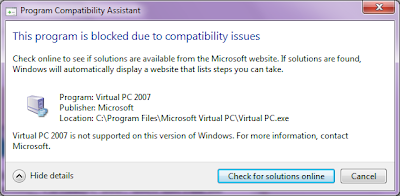
Ok here's the update. Windows is supposedly have a successor to desktop virtualization called Windows Virtual PC (this is currently in Beta). Well, i wanted a virtual desktop so i downloaded Windows VPC (the VPC website "knew" i was on Windows 7 and directed me to download Windows VPC instead). When i tried to execute, it failed saying i didn't have virtualization hardware (CPU) and i didn't of course (i used a Dell 1525 btw).

So i wanted to use Virtual PC 2007 since its not a requirement there to run VPC technology with hardware virtualization. That failed too, shucks...

Somehow, 7 didn't like VPC 2007. Well, there's a "fix" and it's as simple as removing Windows VPC and also please use Virtual PC 2007 (without SP1).

If you still can't make it work (through Add/Remove programs) and that above compatibility error still pops, the software (which has a KB update) could still be lurking. Remove that too. Here's how :

Go to Programs and Features, select view installed updates and remove the KB958559 update, remove Windows VPC (if you haven't already done so) and restart the computer. That should remove all traces of Windows VPC.

Once again:- To run VPC 2007 in Windows 7 (in RC build 7100)
  1. Remove all related software to Windows VPC (also remove update KB958559 in "uninstall updates")
  2. Instal VPC2007 without SP1 (somehow this has driver issues)
And that sort of fix my VPC, everything is great again.

If you are stilllllll having problems, i suggest the Open Source's Virtualbox for Windows (http://www.virtualbox.org).

Have fun!

Thursday, July 30, 2009

Google Chrome and Mozilla Firefox non standard port (e.g. Port 79, 6000)

Was trying to access some ports on a customer's website which someone mapped it to 79. 79 is normally used for finger. For Internet Explorer, it works out right. This doesn't work for Google Chrome and Firefox (out of the box)

Well, for Firefox users, there's a solution. Here's how

Unblocking/allowing ports in Firefox
  1. Launch Firefox
  2. Go to the address bar and type about:config. Firefox will complain about some warranty just click ok or "I'll be careful, i promise" button
  3. Anywhere inside the list of configurations, right click and say New --> String
  4. In the string value, enter network.security.ports.banned.override then click OK
  5. It will now ask you what port, say 79 or whatever port you need to have firefox access. Click OK.
  6. And try again to the website you want to access. These settings should remain forever.
For Chrome, we've got some bad news, it is not possible to access certain ports. This is confirmed by Google Chrome team members. The only way is to get the hosting site to change and not to use following ports.

Chrome banned ports: http://src.chromium.org/viewvc/chrome/trunk/src/net/base/net_util.cc look under the kRestrictedPorts directive.

Wednesday, July 29, 2009

Conficker: Easy cleaning steps

Hi guys,

Was at a client recently and found they've got a huge collection of the conficker worm residing around their network and causing mayhem.

I am actually quite surprise that some big brand AV products didn't quite do the job :(

It is important to know, if your network suddenly face these symptoms:
  1. Disable access to certain sites including Microsoft, known Antivirus sites
  2. Creates a lot of traffic on your network
  3. Makes domain controllers slow to respond
  4. Force account lockouts on domain computers
  5. Many other stuff (depending on the variant)
These symptoms could be due to Conficker. It could be already residing dormant and your antivirus could suddenly prompt a virus detected every once in a while.

Okay, this is meant to quickly get you started on the removal process. It's not meant to replace the extensive guide posted on Microsoft's website, but it's a summary of things you should immediately do/work on.

These are steps i took to fix problems quickly on a notebook and i've asked the client to do them on all workstations (which is something you need to do too..:) )...

  1. Perform Windows Update. http://windowsupdate.microsoft.com . Get service packs if needed. Run windows update at least twice.

    a. If you do not want to run Windows update, just get this patch: http://support.microsoft.com/kb/958644 the patch from the MS08-067.

    b. Download and install this KB patch http://support.microsoft.com/kb/967715/ .Look under the “Prerequisites to disable Autorun capabilities” section and download according to your system. Without this patch, some computers may not be able to disable network autorun function which the virus can propagate. Now, go ahead and disable autorun via GPO/manually like described in that article.

  2. Download and install (the free version). http://www.malwarebytes.org/mbam-download.php
    a. Close all running applications include browsers etc.
    b. Install the software
    c. Update the database (as instructed during setup)
    d. Run the scan (as instructed during setup)
Performing the above does not permanantly fix the problem, you still need to get your antivirus installed/updated to the latest if you've not already done so.

Also, to prevent further reinfection/propagation, do these for the time being;
  1. Stop the Task Schedular service in all your Windows machines. (this service allows you to automate processes based on time, such as windows backup. It is safe to remove them on workstations under the assumption that automated running programs are not needed on desktop levels)
  2. Stop the Server service on desktops (not server). The server service allows it to share files accross the network. To access shared files, is the Workstation service. Just stop the server service for the time being until you've got the network sorted out.
  3. Start scanning like the steps above.
The above should already sort you out quite a bit. After you've got the situation under control. Now, get those updates in place for both OS and AV.

Thursday, July 23, 2009

Nagios Read Only User


By default your Nagios user will have full access to the web interface. This mean, he/she can do just about anything like stopping checks etc.

Here's a quick guide on how to enable read only user access for your nagios web interface.

This document assumes:
1. Nagios 3 (may work for 2, please try, if it works, pls post a comment)
2. Apache2
3. Debian 3 (or higher)
4. Authentication on Nagios is enabled
 
You need to find out where apache is storing your htdigest or htpasswd file in your apache sites-enabled config file. In that file, for the nagios website, you should see the link to the htpasswd or htdigest file.
 
Edit that file add your new users there. You can generate new users with user/realm/password pair via CLI tools such as #htpasswd or #htdigest or use this page similar to this http://www.htaccesstools.com/htpasswd-generator/ to generate that readonly user, for this guide, we will use the username rouser and password rouser.
 
E.g. generating a htaccess file for Nagios rouser
#htpasswd -c /tmp/rouser.txt rouser
 
This created a file in /tmp/rouser.txt, which has content like this;

rouser:ug/fib3zqISok
 
Paste that exact line inside the .htaccess (or htdigest) file that you found in sites-enabled in apache.

Now, you can test access with that user already on your Nagios web screen. You will notice, it doesn't have any access to anywhere except for the static images/html in there.

To provide rouser with rights to see stuff, simply edit your nagios cgi file normally found in /usr/local/nagios/etc/cgi.cfg. Look for the directives

authorized_for_all_services=nagiosadmin
authorized_for_all_hosts=nagiosadmin

And add next to it with a comma, the rouser which you just created like below:

authorized_for_all_services=nagiosadmin,rouser
authorized_for_all_hosts=nagiosadmin,rouser

Now, you need to restart the Nagios daemon. Then sign in again (shutdown your browser) with user rouser and password rouser. You now can see everything but cannot access those CGI commands therefore making it read-only.

Now, if you want to make access specific for certain hosts only, then you need to match the user you create with the contacts definition files. So, user rouser can be rouser-switches for instance and now he/she see read only for switches.

Try it out and let us know the outcome.