Friday, February 6, 2009

Chrome Incognito doesnt work with Facebook (And perhaps other sites too)

Hi just to let you guys know, when testing InCognito mode on Chrome, certain sites don't work, these are some popular sites like facebook, hotmail and probably others as well. This is possibly because Incognito mode doesn't allow browser/computer information be taken off the brower to the server and therefore causing the website code unable to identify the type of browser that you are using normally used for compatibility checks. 


Google Calendar's also breaks but Gmail works...

The problem doesn't appear to be in IE's InPrivate though. So lets get down on what these browsers present to webservers in different modes like normal vs secure mode of browsing. This will give you an idea why sites like Facebook kicks out some modes and allow others..

Chrome without InCognito
Browser (User Agent):
Mozilla/5.0 (Windows; U; Windows NT 5.1; en-US) AppleWebKit/525.19 (KHTML, like Gecko) Chrome/1.0.154.46 Safari/525.19

Chrome when in Incognito mode
Browser (User-Agent): 

IE without InPrivate mode
Browser (User-Agent): 
Mozilla/4.0 (compatible; MSIE 8.0; Windows NT 5.1; Trident/4.0; Mozilla/4.0 (compatible; MSIE 6.0; Windows NT 5.1; SV1) ; InfoPath.2; FDM; .NET CLR 2.0.50727; OfficeLiveConnector.1.3; OfficeLivePatch.0.0)

IE when InPrivate mode:
Browser (User-Agent):  
Mozilla/4.0 (compatible; MSIE 8.0; Windows NT 5.1; Trident/4.0; Mozilla/4.0 (compatible; MSIE 6.0; Windows NT 5.1; SV1) ; InfoPath.2; FDM; .NET CLR 2.0.50727; OfficeLiveConnector.1.3; OfficeLivePatch.0.0) 

So, there you have it, that's why those sites bitch about your Chrome in InCognito mode, whereas IE's InPrivate mode tells the server everything about you in InPrivate, sigh, something that Microsoft should seriously rethink. Afterall, its call INPRIVATE right..

Happy weekend.
Sanjay

Thursday, February 5, 2009

Windows 7 Bypass "UAC"


I read a recent online article that UAC can be switched off without user intervention in W7. I was curious to test it out. So i powered up my good ol' VM running W7 and tested the script. Firstly i logged on as a "normal" user, the script "died" goes about all its steps, but at the point of changing the UAC, it fails, simply because you need to be admin to do that. So, lets try with admin..

True enough, the script kinda worked. And UAC was disabled after the restart. Ok, you may be thinking this is crazy and there goes Windows 7 security! Hang on, its not so much the case. Why?
  • You must be logged on as an Administrator group member to make this work
  • Windows tells you that UAC has been turned off (if you know you didn't do this, you can easily go turn it back on)
  • The script must be executed by someone or something, meaning, a intervention is required, not automation.
  • You can turn on UAC to notify you of changes, therefore, apps like this won't run.
  • So the conclusion is, its not much of a threat. It's like asking a user to run formatmypcvirus.exe and the user runs it, of course la..they will be compromised.
Perhaps Microsoft could make it a little more difficult to change UAC by enabling UAC before UAC can be modified. According to Microsoft, this is not a bug and the case is closed..hmm..

Microsoft's predicament:
The change we made in Windows 7 default UAC settings is that any operation that is necessary to manage windows will not require an elevation - which in technical terms translates into a white list of trusted action / binaries which the user can make perform without UAC prompting from an elevation. This list does include windows file operations

Source script: Rafael Rivera http://www.withinwindows.com/

Tuesday, February 3, 2009

Launching InPrivate/Incognito ala CLI and InPrivate testing of its claims ;)

This is a by the way article since i've got nothing better to do sitting at a client after a network migration.

Alright, a little history, Internet Explorer 8/Chrome comes with a feat called InPrivate/Incognito browsing. InPrivate and Incognito, as the name implies ensure whatever you do in that browsing session is not cached, remembered or anything likewise. This is extremely cool especially if you use internet banking and other sites you wish not to place "traces" of including porn and warez sites (haha). 

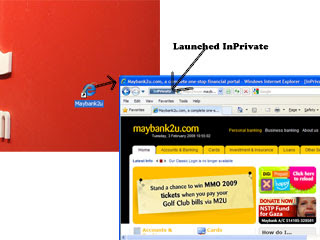
If you are like me, you launch certain websites through an icon on the desktop and would like to use InPrivate automatically, launch the shortcut like this:

Internet Explorer:
iexplore.exe  -private http://www.maybank2u.com


Google Chrome:
chrome.exe --incognito "http://www.maybank2u.com"

In the case above, i am opening http://www.maybank2u.com InPrivate.

Testing IE 8's InPrivate function and the results
What i did:
  1. I cleared all and whatever cache i had (including index.dat - fresh index.dat)
  2. Cleared all passwords, caches in temp internet folders etc..
  3. Cleared anything else there may be using Advance System Care-see below screenie  (http://www.iobit.com/), 

Ok, here's what i wanted to see/find:
  1. Does InPrivate create any files during and when the browser is shutdown
  2. Does InPrivate write indexes to index.dat
  3. Does it create any phantom caches anywhere else.
Tools i use:
  1. Process Explorer (procmon)
  2. File Monitor (filemon)
  3. Advance SystemCare by IoBit
  4. Index.dat suite 
  5. Check cookies/histories
The test:
  1. Launched www.astalavista.com
  2. Checked tools (while they were running)
  3. Checked against the tools
The results: (After closing the browser)
  1. No history found!
  2. No cookies!
  3. No temp files!
  4.  Index.dat cached everything else that i did previously, inspite running cleanups..sheeezee (hmm) but didn't cache stuff when i used InPrivate
So, i am convinced, InPrivate lives to its promise. Hah!..cool. Next up, checks on Chrome's InPrivate.

Cheers!

Thursday, January 29, 2009

The All New Windows 7 - Security Review (Out of the box)

Ok, i've just had my hands on Windows 7 Beta DVD (thanks to Rizal from MS). I took some time to test the base operating system and try to put a review up in here for those who are interested to know what's installed for this new operating system from Microsoft.

Summary
Ok, in a few words, Win7 is like Vista on steriods. Faster, slickier and more customizable than Vista is and probably will ever be. From installation, boot to user interface and response time, i was fairly impressed. Windows 7 is far sexier. Vista attempted to be pretty but sacrificied performance, Windows 7 has a fine balance of both. Security wise, it creates an environment more customizable and user friendly and not scare people off like what Vista did sometimes. So, Windows 7 achieved a nice balance here too.

NOTE: This review is a standalone Windows 7 review without having enterprise features such as Active Directory integration, Network Access Protection, Centralized management etc..

Ok, here's what i was running. 
  • 784MB Ram
  • 2 Processors enable
  • VMWare 6.5.1
Please note the recommened specs for running Windows 7 and downloading beta can be found here

I used a VMWare Workstation, it's not the best platform to evaluate an operating system. I am referring to testing Vista on VM which was slow like helllll....

Ok, so the installation starts with a nice impressive screen. Took me roughly 45 minutes to finish it all. Screenies below:


Ok, as i said, in 45 minutes flat, i've got to login and use the OS. First thing when i finished installing, i had 3 important updates available already so i downloaded and installed them. The version i was running was built 7000.


So as seen in the screenie above, obviously there was some more work done after the public beta was made available. Out of those 3 updates none for the operating system itself. The only one from Microsoft itself comes for Media Player which some decoder renderation corruption fix. 

So, then i launced Internet Explorer, yes, IE 8 is installed by default (version beta 8.0.7000, RC1 wont install on Windows 7 for streamlined testing purpose). IE8 is significantly faster (warm and cold start time) compared to its predecessors. The features do make the internet a little bit more safer (check this review on IE8) . 

Points to note on IE8 i personally liked
  • Cold and warm starts faster than Google Chrome
  • Uses much less memory than Firefox
  • When freshly installed, it will present a wizard to take you through securing and personalizing IE
  • It has a "Safety" tab which you can access to quickly do stuff like clear history and turn on safe browsing feature called Smart Screen.
  • InPrivate browsing (like Chrome's Incognito Mode) - Allows to lauch a new windows but nothing gets cached, remembered etc (normally used for browsing porn etc..haha
Alright, lets look at Windows network security a little. I ran an NMAP on the out of the box install of Windows 7 with the following nmap command arguments:

Nmap scan: nmap -PE -PA21,23,80,3389 -A -v -T4 192.168.11.128

NMAP couldn't identify the OS fingerprint well simply because Windows firewall was turned on. So, i set my network location to be Home (thus relaxing the firewall setting etc). I ran the NMAP scan again and the only thing that poped up was this:
This is what Nmap found: 5357/tcp open  http    Microsoft HTTPAPI httpd 2.0 (SSDP/UPnP)

Which was not too bad considering UPnP is probably used to connect to other Windows machines to share music etc.

So, by design, Windows Firewall was turned on and even in "Home" mode, no risky services was published out. Which i thought was better than XP (Vista had it the same also)

So, now i turned off the firewall completely and ran the same scan/test:

Nmap found the following ports opened.
  • Discovered open port 49153/tcp on 192.168.11.128
  • Discovered open port 135/tcp on 192.168.11.128
  • Discovered open port 445/tcp on 192.168.11.128
  • Discovered open port 49155/tcp on 192.168.11.128
  • Discovered open port 49154/tcp on 192.168.11.128
  • Discovered open port 139/tcp on 192.168.11.128
  • Discovered open port 5357/tcp on 192.168.11.128
  • Discovered open port 49152/tcp on 192.168.11.128
  • Discovered open port 49156/tcp on 192.168.11.128

Those ports all are RPC/UPnP ports and are normal on Windows. By turning off the firewall, i couldn't find any other "weird"services running. NMAP discovered the OS to be Windows Vista SP0 or SP1 or Windows 2008 in its finger printing. Through NetBIOS we could find (of course) its Windows 7 7000.

Then i ran Nessus with latest plugin update as of 29 Jan 2009. The scan with all options enabled and with SMB password provided yielded almost the same result as Nmap. There were no vulnerabilities (probably none developed for Nessus yet) discovered for now and thus the it had 0 high, 0 medium and 22 low (10 open ports were found). The 22 low ones are service enumeration from NetBIOS. But of course. Nothing was discovered again when the firewall was turned on.

Note: Hundreds of scans were performed through Nessus including DoS attacks, common exploits, etc.. 

Ok, moving out of TCP-IP, i was poking around with a few more features of security that might be of interest to you:


Security that i liked in Windows 7:

  1. Microsoft delivered as promised - Windows 7 does come secure out of the box with enabled UAC, firewall, IE's Protected Mode, Action Center etc...
  2. Action Center - This combines all the security related tasks under one roof like Firewall, Malware protection, Restoration Points, backups, User Access Control, Troubleshooting these that i've just mentioned.
  3. Bitlocker now supports encryption of removable drives! (Finally!)
  4. UAC - UAC or User Access Control now can be customized to four settings basically to reduce any annoying messages from Windows that may look pretty serious and malicious but in actual fact you were just changing IP (like what happened in Vista..pff)
  5. Windows Vault - Where you can manage clear passwords, certificates and other Windows passwords within this vault therefore removing the need to install 3rd party tools

Well, there you have if (for now). I hope to get more apps installed and i hope to post the results of my outcome here as well.

Cheers! 

Wednesday, January 21, 2009

World's Fastest MD5 Crack

Ever wondered what does this "463c8a7593a8a79078cb5c119424e62a" MD5 string mean? Well, i don't and will never (i am no God) probably.

Lets say you get your hands into a database which so calls hashed passwords using MD5 (without salts) and would like to reverse this hash (yes, i said reverse an MD5 hash-how kewl) then try this tool from Svarychevski Michail Aleksandrovich called BarsWF. Its by far the world's fastest Md5 cracker:

There are multiple versions, some use the power of your video card and some just the CPU to run the process.

AMD BROOK Beta 0.9: - ATi/AMD card 2xxx, 3xxx, 4xxx
BarsWF Brook x64
BarsWF Brook x32

CUDA 0.8: - nVidia GeForce 8xxx and up, at least 256mb of video memory.
BarsWF CUDA x64
BarsWF CUDA x32

SSE2: (P4, Core2Duo, Athlon64, Sempron64, Phenom)
BarsWF SSE x64
BarsWF SSE x32

It took me a couple of seconds to unhash "pass" and as i am writing this, i am trying to unhash another "complex" password of mine from an application that stores the passwords in MD5 (web based).

Check out my CPU and the application in action


Just download the appropriate version, or just use the SSE2 one if you are unsure and try to crack the hash "463c8a7593a8a79078cb5c119424e62a" as seen above. Location: http://3.14.by/en/md5

To give you a hint and make life easy, this MD5 just have alphabets in lowercase only :).

So, to run the tool with knowing the "hint" above (well in real life you won't really know but to just guess, of course, having more complex phrases and lenght will definately increase the time it will take to reverse)

BarsWF_SSE2_x32.exe -h 463c8a7593a8a79078cb5c119424e62a -c a
[the .exe] + -h [the hashed Md5 string] + -c [a]

Usage:
-? Prints this help
-r Continue previous work from barswf.save BarsWF updates it every 5 minutes or on exit
-h [hash] Set hash to attack
-c 0aA~ Set charset. 0 - digits, a - small chars , A - capitals, ~ - special symbols
-C "abc23#" Add custom characters to charset.
-X "0D0A00" Add custom characters in hex to charset.
-min_len 3 Minimal password length. Default 0. MAX 15!!! :-]


Once you've runned the command above, let me know the value of the Md5 string :). Have fun.

One tip, notice only 15 characters MAX, meaning, if you are planning to use MD5, encourage the use of >15 chars, it is computationally very very very hard to crack that in humanly possible time.

MD5 according to wiki: n cryptography, MD5 (Message-Digest algorithm 5) is a widely used cryptographic hash function with a 128-bit hash value. As an Internet standard (RFC 1321), MD5 has been employed in a wide variety of security applications, and is also commonly used to check the integrity of files. However, it is now known to be partially insecure[1] thus reducing its suitability for these purposes. An MD5 hash is typically expressed as a 32 digit hexadecimal number.

Tuesday, January 20, 2009

How To Suck At Information Security

Hi guys, been a while, hope you are all well.. Thought of starting the new year with an interesting article from SANS..hope you enjoy it.

The following list presents common information security mistakes and misconceptions, so you can avoid making them.

Security Policy and Compliance

* Ignore regulatory compliance requirements.
* Assume the users will read the security policy because you've asked them to.
* Use security templates without customizing them.
* Jump into a full-blown adoption of frameworks such as ISO 27001/27002 before you're ready.
* Create security policies you cannot enforce.
* Enforce policies that are not properly approved.
* Blindly follow compliance requirements without creating overall security architecture.
* Create a security policy just to mark a checkbox.
* Pay someone to write your security policy without any knowledge of your business or processes.
* Translate policies in a multi-language environment without consistent meaning across the languages.
* Make sure none of the employees finds the policies.
* Assume that if the policies worked for you last year, they'll be valid for the next year.
* Assume that being compliant means you're secure.
* Assume that policies don't apply to executives.
* Hide from the auditors.

Security Tools

* Deploy a security product out of the box without tuning it.
* Tune the IDS to be too noisy, or too quiet.
* Buy security products without considering the maintenance and implementation costs.
* Rely on anti-virus and firewall products without having additional controls.
* Run regular vulnerability scans, but don’t follow through on the results.
* Let your anti-virus, IDS, and other security tools run on "auto-pilot."
* Employ multiple security technologies without understanding how each of them contributes.
* Focus on widgets, while omitting to consider the importance of maintaining accountability.
* Buy expensive product when a simple and cheap fix may address 80% of the problem.

Risk Management

* Attempt to apply the same security rigor to all IT assets, regardless of their risk profiles.
* Make someone responsible for managing risk, but don't give the person any power to make decisions.
* Ignore the big picture while focusing on quantitative risk analysis.
* Assume you don't have to worry about security, because your company is too small or insignificant.
* Assume you're secure because you haven’t been compromised recently.
* Be paranoid without considering the value of the asset or its exposure factor.
* Classify all data assets as "top secret."

Security Practices

* Don't review system, application, and security logs.
* Expect end-users to forgo convenience in place of security.
* Lock down the infrastructure so tightly, that getting work done becomes very difficult.
* Say "no" whenever asked to approve a request.
* Impose security requirements without providing the necessary tools and training.
* Focus on preventative mechanisms while ignoring detective controls.
* Have no DMZ for Internet-accessible servers.
* Assume your patch management process is working, without checking on it.
* Delete logs because they get too big to read.
* Expect SSL to address all security problems with your web application.
* Ban the use of external USB drives while not restricting outbound access to the Internet.
* Act superior to your counterparts on the network, system admin, and development teams.
* Stop learning about technologies and attacks.
* Adopt hot new IT or security technologies before they have had a chance to mature.
* Hire somebody just because he or she has a lot of certifications.
* Don't apprise your manager of the security problems your efforts have avoided.
* Don't cross-train the IT and security staff.

Password Management

* Require your users to change passwords too frequently.
* Expect your users to remember passwords without writing them down.
* Impose overly-onerous password selection requirements.
* Use the same password on systems that differ in risk exposure or data criticality.
* Impose password requirements without considering the ease with which a password could be reset.

Thursday, August 28, 2008

Microsoft Exchange Alternative?

Tuesday, August 5, 2008

Asterisk Appliance and Fax


Hi all, just a little update on the faxing effort that was attempted from a FreePBX trunked via a IAX2 tunnel to an Asterisk Appliance failed miserably.

Fact of the matter is faxing through Asterisk Appliance is a no go. Even using an ATA adaptor in between the fax machine and the Asterisk Appliance didn't handshake. Sending and receiving.

Workaround: Since we had a FreePBX running, we registered the ATA to this server instead of the Asterisk Appliance and viola...it works like a charm (although sending faxes seem to be a little tricky..sigh)

Anyway, just an update

Thursday, July 31, 2008

Free Microsoft Exchange Monitor, by Solarwinds

Since a while now, i've been a huge fan of Solarwinds (http://www.solarwinds.com) before knowing and falling in love with Nagios (www.nagios.org). Well, this post isn't to harp on the sexy Nagios but to talk about a quick monitoring tool for Exchange servers. Solarwinds released their monitoring tool for Exchange and i like it for its simplicity to use.

The most significant part is that it's free, which means, go download it even if you don't plan to use it (haha). Here's the link. http://www.solarwinds.com/register/index.aspx?Program=825&c=70150000000Djc6

The good thing about this tool, it not only does monitoring of basic OS health but the health of Exchange at the application level.

Exchange, as many of us know, is like an infant, she will cry bloody murder if you don't stick a suckle up her mouth every once in a while. But, lets admit it, who has the time to stare blankly at the ugly perfmon (Windows Performance Monitor) or run dry WMI scripts to spring VB's blend popups if there's something odd, out of the ordinary odd (i like scripting better tho).

This a true free engine unlike the many baits set out there to lure you into the overly abused word FREE (opensource aside) which won't sneak a time-bomb behind you or skin features down to mere lousy 2 functions of the 1000000 functions a paid one can do. I hope those developers who lure public into these monkeytraps just make their software GPL.

Anyway, why i like this piece is cuz it checks;
  1. In real time
  2. General Win health checks (like disks , CPU, memory)
  3. Exchange services
  4. Mail, PF and SMTP queues (see if they are collectively planning to sink the box down)
  5. ..and more "sensors", but not a lot of customization
  6. Pretty little interface to wrap it up but finally
  7. ITS FREE.
Anyway, if you're interested in a more powerful, enterprise scale monitor (which can do the above and much much much much much more) and FREE software, go stick your mouse into www.nagios.org.

Thursday, July 24, 2008

Free DHCP Server

Hi, been a while since i wrote anything here. Anyway, here's something i just had to share with my friends out there.

If you are in a dire need of a DHCP server (i'm laughing at that statement too..), cause the main one crashed or isn't functioning, then you do not necessarily need to install another Windows box or a Unix server just to start pouring out life into our DHCP client devices. Just fire up your XP (or compatible OS) and start this excellent software called TFTPD32.

Firstly, its FREE, yes, FREE la.

TFTPD is a completely functional DHCP server with a TFTP server and client and a SYSLOG server, all in a tiny under 500k binary. Superb stuff. I had to use it to do a TFTP and DHCP to assign a device while upping a TFTP image off the TFTP server.

Its just too simple to use, for DHCP, just define the scope start and the amount of assignable IPs of that scope and usual stuff like Netmasks and also you can create custom DHCP options. Unfortunately, unlike the infamous DHCP server from Windows, the options are not selectable and if you do not know what options are there, you could Google it or simply click here...http://www.networksorcery.com/enp/protocol/bootp/options.htm .

Finally, this tool is a network arsenal, to
1. Do all of what it's capable of (like DHCP-ing, TFTP-ing...)
2. Turnturtle your ex's network by just plugging in this baby into any network and assign bogus IPs thus causing a DHCP offer from yours and an existing DHCP server ....

Their official website where you could download the software: http://www.jounin.net/tftpd32.html

Screenies from my DHCP setup couple of hours ago